Outbound Workers
Outbound Workers sit between your customer’s Workers and the public Internet. They give you visibility into all outgoing fetch() requests from user Workers.
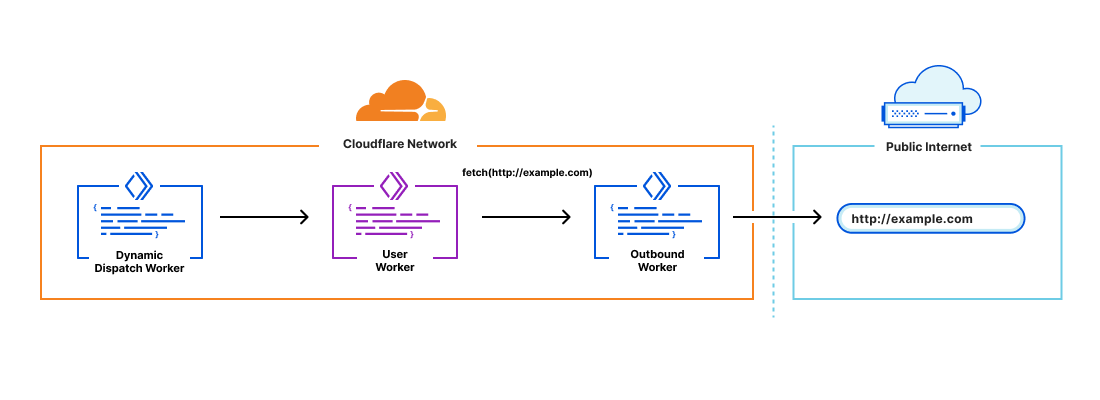
General Use Cases
Outbound Workers can be used to:
- Log all subrequests to identify malicious hosts or usage patterns.
- Create, allow, or block lists for hostnames requested by user Workers.
- Configure authentication to your APIs behind the scenes (without end developers needing to set credentials).
Use Outbound Workers
To use Outbound Workers:
- Create a Worker intended to serve as your Outbound Worker.
- Outbound Worker can be specified as an optional parameter in the dispatch namespaces binding in a project wrangler.toml. Optionally, to pass data from your dynamic dispatch Worker to the Outbound Worker, the variable names must be specified under parameters.
Make sure that you have wrangler@3.3.0 or later installed.
wrangler.toml[[dispatch_namespaces]]
binding = "dispatcher"
namespace = "<NAMESPACE_NAME>"
outbound = {service = "<SERVICE_NAME>", parameters = ["customer_name","url"]}
- Edit your dynamic dispatch Worker to call the Outbound Worker and declare variables to pass on
dispatcher.get().
index.jsexport default {  // this event is fired when the dispatched Workers make a subrequest  async fetch(request, env, ctx) {    // env contains the values we set in `dispatcher.get()`    const customer_name = env.customer_name;    const original_url = env.url;
    // log the request    ctx.waitUntil(fetch(      'https://logs.example.com',      {        method: 'POST',        body: JSON.stringify({          customer_name,          original_url,        }),      },    ));
    const url = new URL(original_url);    if (url.host === 'api.example.com') {      // pre-auth requests to our API      const jwt = make_jwt_for_customer(customer_name);
      let headers = new Headers(request.headers);      headers.set('Authorization', `Bearer ${jwt}`);
      // clone the request to set new headers using existing body      let new_request = new Request(request, {headers});
      return fetch(new_request)    }
    return fetch(request)  }
};
- The Outbound Worker will now be invoked on any
fetch()requests from a user Worker. The user Worker will trigger a FetchEvent on the Outbound Worker. The variables declared in the binding can be accessed in the Outbound Worker throughenv.<VAR_NAME>.